- Product

- Pricing
- Affiliate Program
- Developers
- Resource
 EN
EN
Most people know cookies can track them. Browser fingerprinting is harder to notice.
A browser fingerprint is the technical profile your browser shows to a website, built from signals like browser version, operating system, screen size, time zone, fonts, graphics behavior, and other device details that together can form a unique pattern.
You clear cookies. You open a private window. You switch accounts. A site may still recognize the same browser from those signals, which is why fingerprinting matters for privacy, fraud detection, bot checks, security review, and account trust.
This guide is written for digital marketing agencies, affiliate marketers, e-commerce sellers, social media managers, Web3 teams, and anyone running multiple accounts or mobile apps in isolated environments without detection risk.
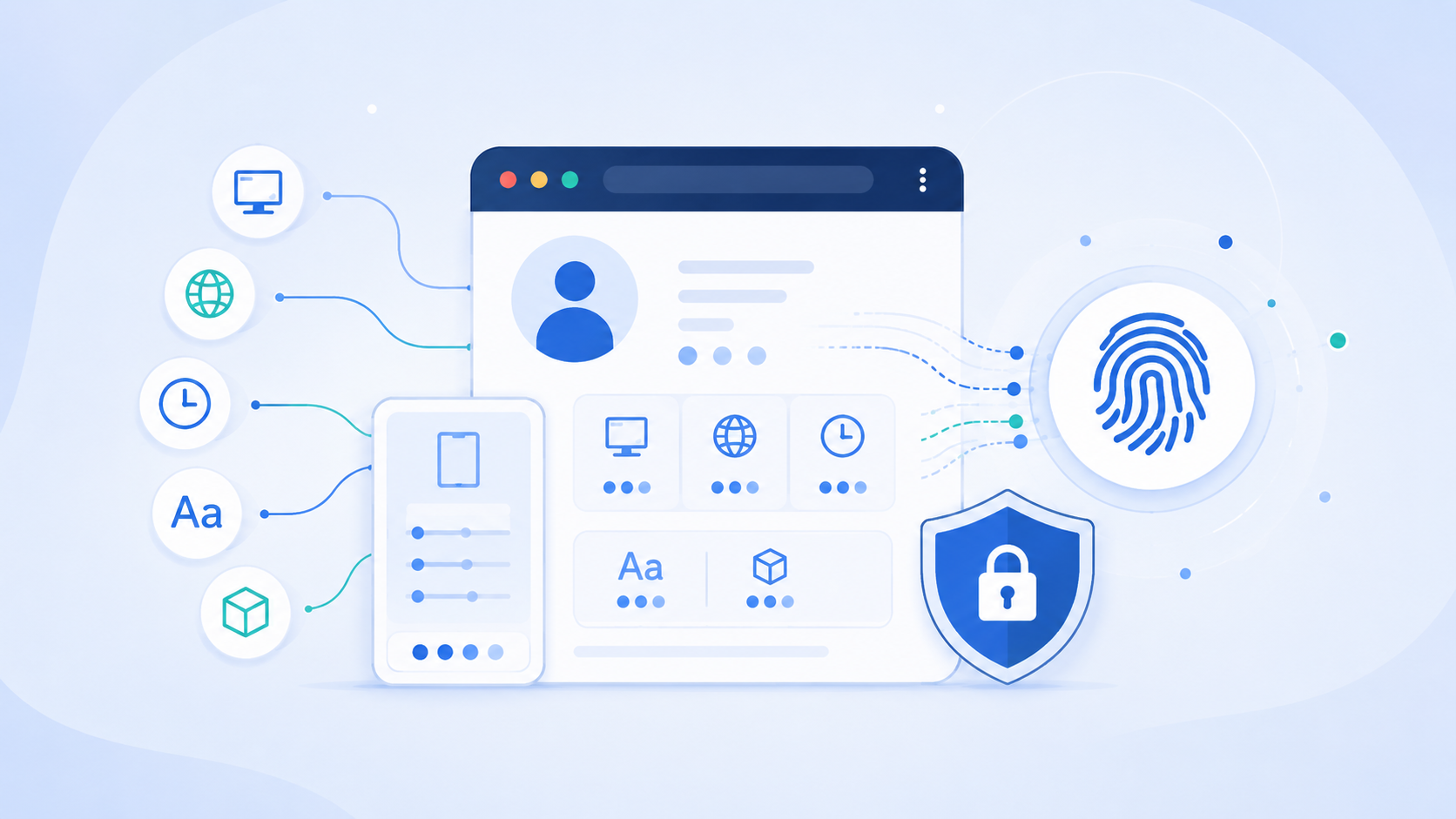
A browser fingerprint is a profile made from the details your browser and device expose during a website visit.
It is not just your IP address. It is not just cookies. It is not one hidden file sitting inside your computer.
It is a combination of signals.
A website may check your browser type, operating system, screen size, language, time zone, installed fonts, canvas rendering, WebGL output, audio behavior, and other technical details. One signal alone may not say much. The combination can make your browser easier to recognize.
So, what is a browser fingerprint in plain English?
It is the visible technical pattern of your browser environment.
This pattern can be used in different ways. Some websites use it to protect accounts. Some use it to reduce fraud. Some use it to detect bots. Some trackers may use it to follow users across websites.
If you want a deeper technical breakdown, this browser fingerprint guide explains how browser signals are collected and used in real account environments.
The key point is simple. The hard part is not knowing the definition. The hard part is knowing how fingerprint signals affect trust, tracking, and account safety.
Browser fingerprinting usually starts when a website loads fingerprinting scripts in your web browser, which is how browser fingerprinting work begins. These scripts read signals that are already available during normal browsing.
The process is usually like this:
You open a website
The website loads scripts
The scripts read browser and device signals
Those signals are combined into a profile
The profile may be turned into a unique identifier used to identify users across future visits
The website compares the same profile across browsing sessions and user visits
A browser fingerprint is not like a cookie file. Cookies are stored client-side as text files, while fingerprinting rebuilds a profile from browser data and other data points when a website checks your browser again.
That is why clearing cookies does not fully solve the issue. Cookies are stored data. A browser fingerprint is based on how your browser appears.
Private browsing also has limits. It can reduce local storage and session history. It does not remove your browser version, screen size, system language, time zone, graphics output, or font behavior.
A fingerprint can change. Browser updates, new extensions, system changes, and profile changes can all affect it. But there is no clean reset button that makes every signal disappear while the browser still works like a normal modern browser.
This is the part many beginners miss when they first ask what is a browser fingerprint.
A browser fingerprint is useful because it combines many small signals. Some are basic. Some are technical. Some look harmless during normal browsing, but become more useful when compared over time.
The real issue is not one signal. It is whether the whole environment makes sense.
This is where many account operators make mistakes. They focus only on proxies and ignore the browser side. A clean proxy does not fix a browser profile with mixed signals. If the IP says one thing, the time zone says another, the language says another, and the browser looks automated, the account environment is not clean.
The reverse is also true. A well-set browser profile does not save bad behavior, weak accounts, or poor proxy choices.
Browser fingerprint management is not about one perfect setting. It is about reducing conflicts.
Cookies and browser fingerprints are often discussed together, but they work differently.
Cookies are stored inside the browser. A website can save a small piece of data there and read it later. This is why cookies are used for login sessions, carts, preferences, and tracking, and why they often function as a persistent identifier.
A browser fingerprint is different. Cookies and fingerprinting are both tracking techniques used for online tracking and tracking user behavior online, but they work differently. It is built from the browser and device signals exposed during a visit, so it can also act like a more durable persistent identifier because it is rebuilt from signals.
The practical difference is clear:
Cookies are stored data
A browser fingerprint is rebuilt from browser signals
Cookies can usually be deleted
A fingerprint may still look similar after cookies are cleared
Cookies are easier for users to see and manage
Fingerprinting is usually less visible
Cookies depend on browser storage
Fingerprinting depends on how the browser appears to the website
This is why cookie clearing is not enough. It removes stored site data. It does not change your fonts, screen size, graphics behavior, time zone, browser build, or device signals.
That does not mean fingerprinting is perfect. It can be noisy. It can change. Good risk systems should not treat a fingerprint as the only proof of identity. Some systems also use transport layer security fingerprinting by analyzing the handshake process for secure connections, which is separate from browser storage.
But for account safety, you should treat cookies as only one layer. The full browser environment matters.
A browser fingerprinting attempt is when a website, script, or risk system tries to read browser signals and build a profile from them.
The word attempt can sound suspicious, but the use case matters.
A fingerprinting attempt may happen during:
Login checks
Payment risk checks
Bot detection
Account abuse reviews
Multi-account checks
Advertising tracking for website optimization and measuring ad effectiveness without relying on cookies
Analytics tracking
Automation detection
A bank or payment platform may use browser signals to check whether a login looks normal. A marketplace may use them to catch fake registrations. A social platform may use them to reduce spam and bot activity. Some companies also use browser fingerprinting for behavioral profiling for targeted advertising and other marketing analysis.
That is a security use.
The privacy issue appears when third-party trackers use similar methods to recognize users across websites without clear control.
So, what is a browser fingerprinting attempt in practical terms?
It is an attempt to collect enough browser signals to recognize, compare, or score a browser environment.
The method is not always good or bad by itself. The real question is who is collecting the data, why they use browser fingerprinting, and how much control the user has.
Browser fingerprints matter because they sit in the middle of privacy, security, and account trust.
For personal browsing, the concern is privacy. Fingerprinting can make tracking harder to see. A user may clear cookies but still show a browser setup that looks familiar. Many internet users worry about tracking across multiple sites, while most users mainly notice it when it affects privacy or security.
For platforms, fingerprinting can be useful. Device fingerprinting and digital fingerprinting support fraud prevention and user authentication. It helps detect suspicious logins, bots, fake registrations, account takeovers, and repeated abuse. Unusual signals in a user's browser or user's device can raise risk scores.
For multi-account teams, the issue is more direct. Platforms look at patterns. Browser fingerprinting techniques and other fingerprinting methods help separate legitimate users from malicious users by comparing the user's fingerprint to expected device attributes.
Risk can increase when:
Many accounts use the same browser environment
Profiles share cookies or local storage
Proxy location and time zone do not match
Browser language conflicts with account region
A profile changes too often
Automation traces appear during normal sessions
Different accounts look copied from the same setup
One team member opens the wrong account in the wrong browser
This is why browser fingerprinting should not be treated as a privacy topic only. It is also an operational topic.
If you manage accounts for e-commerce, ads, affiliate work, or social media, the browser environment becomes part of the account history. A messy environment can create messy signals.
The goal is not to look invisible. That is not realistic.
The goal is to keep each account environment separate, stable, and believable.
You cannot clear a browser fingerprint the same way you clear cookies.
That is the honest answer.
You can change parts of it. You can update your browser, remove extensions, use another profile, change settings, or switch devices, though switching between multiple browsers or multiple devices can still expose related patterns through cross browser fingerprinting. But there is no simple reset button that clears every fingerprint signal.
Things that may affect a browser fingerprint include:
Browser updates
System updates
Screen size changes
Extension changes
Font changes
Language settings
Time zone settings
Privacy settings
Browser profile changes
Canvas and WebGL behavior
Audio API behavior
But changing everything randomly is not a strategy.
A rare setup can be easier to recognize than a normal one. This is the part beginners often get wrong. They add too many privacy extensions, spoof too many values, and create a browser that looks strange. In some cases, using default settings can make a fingerprint less unique than heavy customization.
For normal users, a simple setup is usually better:
Use a privacy focused browser if it fits your needs
Keep it updated
Avoid unnecessary browser extensions
Use privacy settings that do not break normal browsing
Block known trackers where possible
Blocking JavaScript can interfere with some tracking scripts, but it only offers partial protection and may break sites
Avoid strange browser configurations
For multi-account work, the answer is different. You need separation. Each account should have its own cookies, storage, proxy, and browser profile.
That is where a fingerprint browser becomes useful.
A fingerprint browser or anti-detect browser is a tool for creating and managing separate browser environments.
A normal browser is fine for daily browsing. It is not built for serious multi-account work.
Once a team manages many accounts, small mistakes become expensive. Someone logs into two accounts in the same browser. Someone uses the wrong proxy. Cookies mix. Local storage overlaps. A profile gets opened by the wrong team member. The account history starts to look messy.
If your question is what is a fingerprint browser or anti-detect browser, the practical answer is simple. It is a tool that helps users control browser environments profile by profile.
A fingerprint browser can help users:
Create separate browser profiles
Keep cookies isolated
Keep local storage separated
Manage fingerprint settings
Assign proxies to profiles
Reduce environment overlap
Organize accounts by project or client
Share access with team members
So, what is a fingerprint browser?
It is not a magic invisibility tool. It is a browser environment manager.
That distinction matters.
No browser can promise that every account will be safe. Platforms also look at behavior, IP quality, account history, device signals, login habits, payment data, and many other factors.
A useful anti-detect browser helps with the part you can control. It keeps browser environments cleaner. It reduces obvious conflicts. It makes account work easier to organize.
That is the real value.
MoreLogin is built for this kind of account workflow.
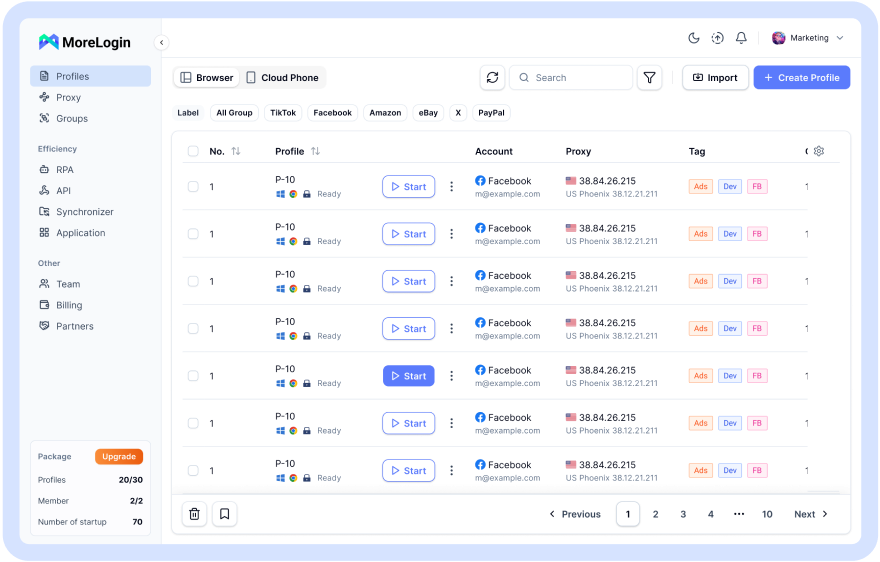
It lets users create isolated browser profiles for different accounts. Each profile can keep its own cookies, local storage, cache, fingerprint settings, and proxy configuration.
That matters because multi-account risk often comes from overlap.
MoreLogin helps manage:
Separate browser profiles
Independent cookies
Independent local storage
Cache separation
Fingerprint settings
Per-profile proxy settings
Team permissions
Profile sharing
Batch profile management
Social media, e-commerce, ads, and affiliate workflows
This is useful for teams because account management is not only a technical issue. It is also a workflow issue.
A lot of account problems come from simple human mistakes. The wrong profile. The wrong proxy. The wrong login. The wrong teammate. The wrong browser.
MoreLogin reduces that kind of chaos by putting each account into its own controlled profile.
It does not remove every risk. It does not make bad account behavior safe. It does not guarantee that every platform will trust every account.
But it gives teams a cleaner way to manage browser fingerprints, proxies, and account environments in one place.
For real multi-account work, that is more useful than a big promise.
A browser fingerprint is the technical profile your browser shows to websites. Through browser fingerprinting and online fingerprinting, sites create a unique profile from browser and device signals such as browser version, operating system, screen size, fonts, time zone, canvas behavior, WebGL output, audio behavior, and other signals.
The important part is the combination. One signal may not say much. Many signals together can make a browser easier to recognize.
For privacy, fingerprinting exists as a way to track people across the web without their knowledge or control, partly to recognize the same user across sessions and, in some cases, across multiple browsers. For platforms, it can help detect fraud, bots, suspicious logins, and account abuse. For multi-account teams, it becomes part of account environment management.
Clearing cookies is not enough. Random spoofing is not a plan. Proxy quality matters, but the browser side matters too.
Whether browser fingerprinting legal questions are acceptable depends on transparency and regional rules, but here the focus is on how the method works and how to reduce exposure. If your team manages multiple accounts and needs a cleaner way to separate browser environments, MoreLogin can help you manage isolated profiles, fingerprint settings, proxies, and team access from one place.
What is a browser fingerprint?
A browser fingerprint is a profile made from browser, device, and system signals. It may include browser version, operating system, screen size, language, time zone, fonts, canvas, WebGL, and other technical details.
Is a browser fingerprint the same as cookies?
No. Cookies are stored client-side as text files inside the browser, while fingerprinting techniques rebuild a profile from signals your browser exposes when it visits a website. Clearing cookies does not fully change those browser signals.
Can I clear my browser fingerprint?
Not in the same simple way you clear cookies. You can change parts of it by changing browser settings, extensions, profiles, or devices. Blocking JavaScript can interfere with some fingerprinting scripts, but it may also break websites. But there is no clean reset button for every signal.
What is a browser fingerprinting attempt?
A browser fingerprinting attempt is when a website, script, or risk system tries to collect browser signals and create a profile from them. It may use canvas fingerprinting or the webgl fingerprinting process in the user's web browser to create a unique user id. It may be used for security checks, fraud detection, analytics, or tracking, and an exact same fingerprint is uncommon because signals can change.
What is a fingerprint browser?
A fingerprint browser is a tool for creating and managing separate browser profiles. Each profile can have its own cookies, local storage, fingerprint settings, and proxy setup.
Can MoreLogin completely hide my browser fingerprint?
No tool can honestly promise complete invisibility. MoreLogin helps users manage isolated browser profiles, fingerprint settings, proxies, and team workflows in a more controlled way.

 EN
EN